Balance an encounter
Set your party's size and level, add monsters from the Bestiary or by challenge rating, and read how hard the fight will be under the 2024 or 2014 D&D rules.
- ~5 min
- New to it
The Encounter Builder tells you how dangerous a fight is before your players find out. It follows the D&D 5e Dungeon Master's Guide: the 2024 budgets or the 2014 adjusted-XP method.
Before you start
- Your party's size and average level.
Build the fight
Open the Encounter Builder
In the TTRPG Realm, choose Encounter Builder. In a campaign, it is under Play tools in the rail.Choose the rules
Press 2024 rules or 2014 rules. The choice also decides which edition's creatures the search below finds.Describe the party
Set Party size and Level.Add monsters by name
Type in Search creatures… and press Add beside the one you want. It comes in with its challenge rating, linked to its Bestiary stat block.Or add one by challenge rating
For a creature that isn't in the Bestiary, pick its CR in Add monster (CR) (each shows its XP, e.g. CR 1/4 · 50 XP) and press Add.Set how many
Use − and + on each row for the number of that monster. Taking the last one away removes the row.Read the difficulty
The card at the bottom rates the fight under Difficulty, live as you change anything.
Check it worked
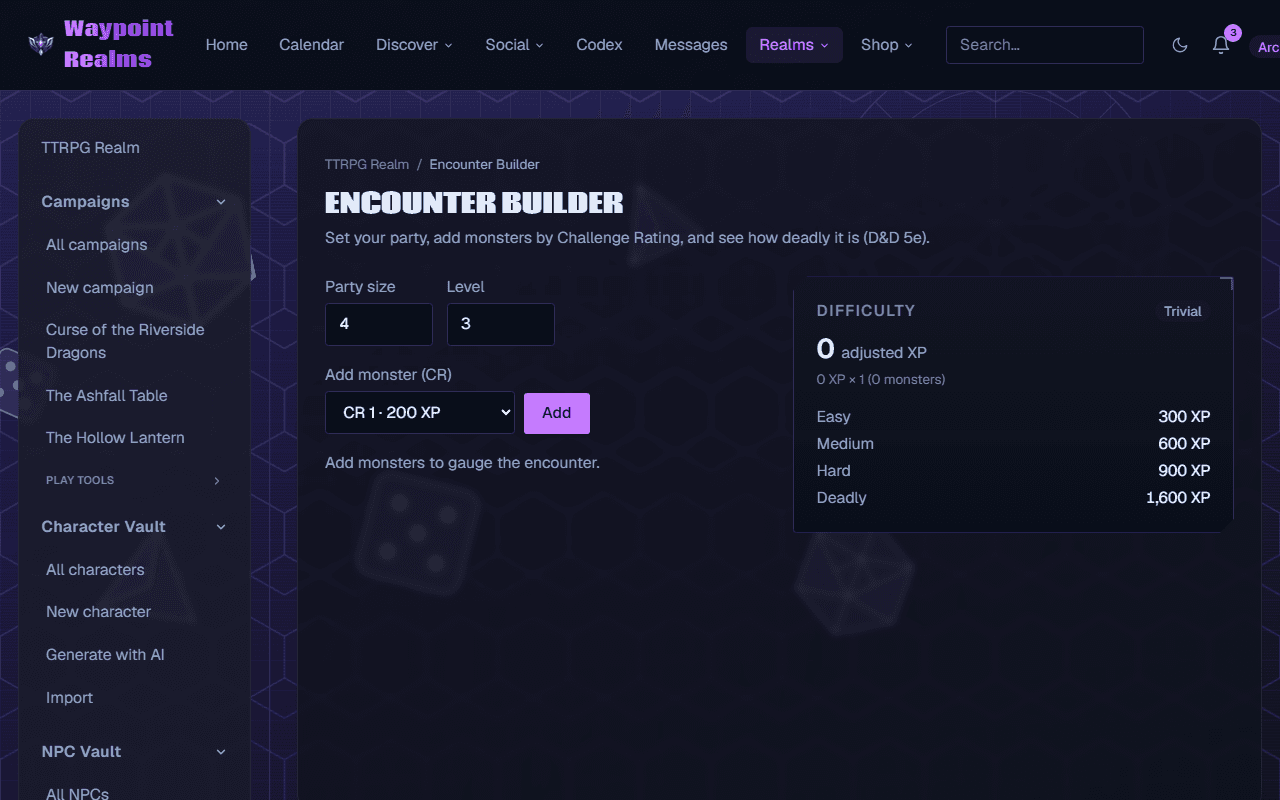
Reading the result
2024 rules: the monsters' XP added together, against the party's Low, Moderate and High budgets. An encounter is the smallest budget it fits inside; Beyond High should be expected to be lethal. There is no multiplier for numbers under the 2024 rules.
2014 rules: the monsters' XP times a multiplier for how many there are (the card shows the sum), against the Easy, Medium, Hard and Deadly thresholds. Below Easy is Trivial.
Nothing is saved
If something's off
- “No creatures match.”
- The search follows the rules you chose: a creature may only exist in the other edition. Switch the rules, or add it by CR instead.
- “Couldn't search the bestiary.”
- The search didn't answer. Try again, or add the monster by CR.
Still stuck? Browse all help or contact us. To report someone or something, use the report action on the relevant profile, post, or session — it sends us the context automatically.