Find a monster in the Bestiary
Search creature stat blocks by name, game, rules edition, type and challenge, and open the full stat block.
Game MastersUpdated October 11, 2026
- ~3 min
- New to it
The Bestiary is a searchable shelf of creature stat blocks for D&D 5e (2024 and 2014 rules) and Pathfinder 2e, among others. Find what you need, open its stat block, and run it.
Before you start
- Nothing to set up.
Find a creature
Open the Bestiary
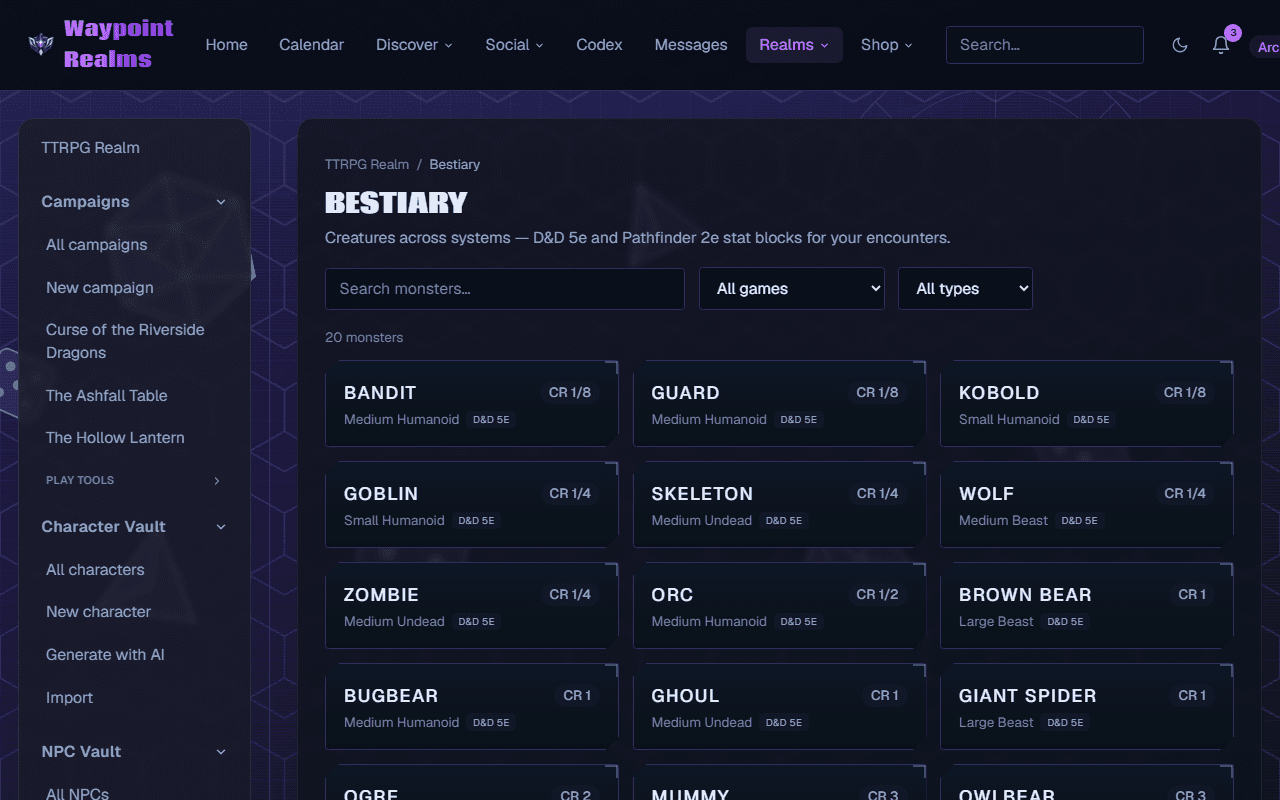
In the TTRPG Realm, choose Bestiary. In a campaign, it is under Play tools in the rail, as a quicker search panel.Search by name
Type in Search monsters….Pick the game
Choose one in the game list, or leave All games. With D&D 5e (or all games) chosen, a second list picks D&D 2024 rules (SRD 5.2.1) or D&D 2014 rules (SRD 5.1) — the two share many names with different stat blocks, so you see one edition at a time.Narrow it down
Choose a creature type (All types by default) and a minimum and maximum challenge: CR for D&D-style games, Level for Pathfinder.Open the stat block
The count above the cards says how many match. Press a card to open its full stat block: Armor Class, Hit Points, Speed, abilities, senses, languages and actions.
Check it worked
The stat block opens on its own page, with where it comes from at the foot (SRD 5.2.1 or 5.1 for D&D; a link to Archives of Nethys for Pathfinder).
Building a fight?
The Encounter Builder searches the Bestiary by name and adds the creature straight into the encounter, with its challenge rating.
If something's off
- “No monsters match.”
- A filter is too narrow — widen the challenge range or set the type back to All types. A D&D creature may only be in the other edition: switch the rules list.
- A creature from a book isn't here
- The Bestiary carries open-licence creatures (such as the D&D SRD), not everything in every published book.
Still stuck? Browse all help or contact us. To report someone or something, use the report action on the relevant profile, post, or session — it sends us the context automatically.