The Anime Realm
A watchlist, a manga shelf, airing reminders, watch parties, a drawing studio, and a curated Atlas of studios, titles and characters.
The Anime Realm is for keeping track of what you are watching and reading, finding out what is on, and watching it with other people.
Early access
Watchlist and manga shelf
Track shows you are watching, want to watch or have finished, and volumes you own or are following. Both are yours; neither is published anywhere unless you share it.
Airing reminders
Follow a currently-airing title and you get told when a new episode is out, with the airing calendar showing the week ahead. Reminders respect your notification settings.
Watch parties
A watch party is a scheduled time to watch something together and talk about it — the conversation lives here, the video does not. You bring your own subscription to whichever service is streaming it. Members get a reminder shortly before it starts.
The Atlas
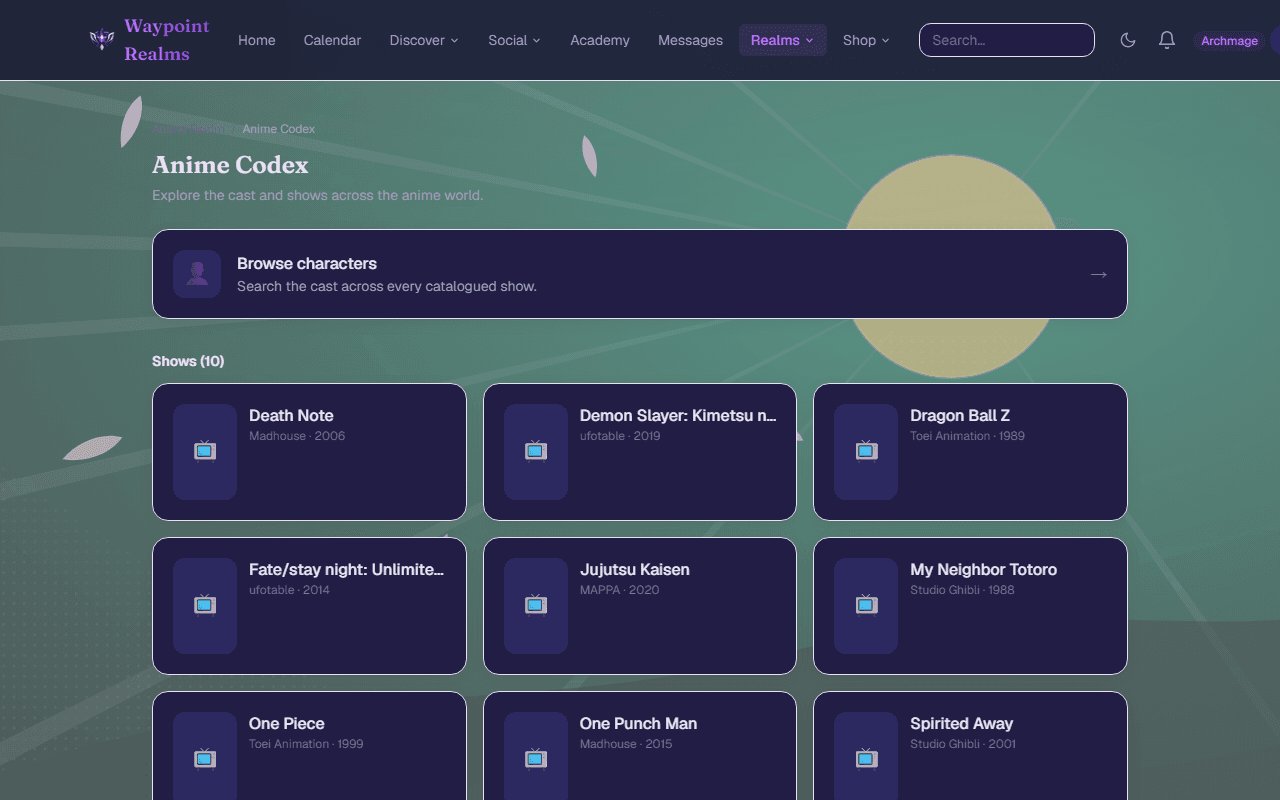
The Anime Atlas is curated: studio → franchise → title, plus a character index. It is readable signed-out, so a search for a show can land someone directly on it. Imported details credit and link to their source.
The Studio
The Anime Studio is for making the art rather than collecting it. Start on a blank canvas or bring in a drawing you already have, work in layers, crop and adjust it, and ink on top with the brush.
Your pieces are private while you work — nobody else can open them, and nothing leaves the Studio until you say so. When one is finished you have two ways out: Save a copy puts a PNG on your own device, and Share to Gallery posts it to the Art Gallery, where you say what it is of — a title, a character, or an original of your own.
Your hands, your art
Deleting a piece is not final: it moves to Recently deleted on the shelf, where it can be restored for 30 days. After that it and its source files are cleaned up for good, so save a copy to your own device for anything you want to keep.
Cel
Cel is for making things move. It works the way animation has always been planned: an exposure sheet along the bottom, one row per layer, showing which drawing is on screen and how long it is held. Draw on a frame and a drawing appears there, held for two frames — shot on twos, like most hand-drawn animation. Drag a drawing along the sheet to retime it, or drag its trailing edge to hold it longer.
Onion skinning shows the drawing before and the drawing after as coloured ghosts, so you can see what you are drawing between. It follows drawings rather than frames: on twos, the previous frame is usually the same picture, and what you actually want to see is the previous drawing.
Every mark is one you made
Getting a scene out of Cel
Four ways, because they are for four different things:
- Animated PNG — the scene as one picture that plays, in full colour with transparency intact. This is also what Share posts to the Art Gallery.
- PNG sequence — numbered stills with an
xsheet.jsonbeside them, for taking into an editor or compositor without hand-retiming it at the far end. - Cel package — the whole scene: the sheet, the layers, every drawing and how it was made. Open package on the shelf brings one back, on any machine and into any account. Your work is yours and it travels.
- Exposure sheet — the paper sheet as a PDF, frames down the page, for the desk beside you.
Shared scenes are screened before they appear, and for an animation that means frames from across the whole thing rather than just the first one.
Deleting a scene is not final: it moves to Recently deleted on the shelf and can be restored for 30 days, after which its drawings are cleaned up for good. Export a package for anything you want to keep.
Discussion
Each title has its own discussion thread — spoiler-aware, and attached to the title rather than scattered across a general feed. If you want a standing group instead of a thread, make a circle.
Still stuck? Browse all help or contact us. To report someone or something, use the report action on the relevant profile, post, or session — it sends us the context automatically.