Add a show or manga and track it
Add a title from the Atlas or by hand, set its status, log episodes or volumes with +1, score it, and keep dates, rewatches and notes — in your Anime & Manga Library.
- ~5 min
- New to it
- Part 1 of 4
Your Anime & Manga Library is one list for both: anime by episode, manga by volume. The Watchlist and Manga Shelf in the rail open its two halves.
Before you start
- A Waypoint account. The library is free.
Add a title
Open the library
In the Anime Realm's rail, choose Watchlist (or Manga Shelf).Start the form
Press + Add a title.Find it in the Atlas
Under Find it in the Atlas (auto-fills title + cover), start typing and pick the show. It reads Linked to the Atlas. For manga, set Kind to Manga first — the box then searches the Comics Atlas.Or enter it by hand
Not in the Atlas? Type the title yourself. For anime, we ask for it to be added, and your entry links up when it is.Set the status
Status: Plan to watch/read, Watching / reading, Rewatching / rereading, Completed, On hold or Dropped.Add the rest (optional)
A score, how far you are and the total, Started and Finished dates, tags and notes. Leave Visibility at Private, or choose Public (in Discover, with your name).Save
Press Add to library.
Check it worked
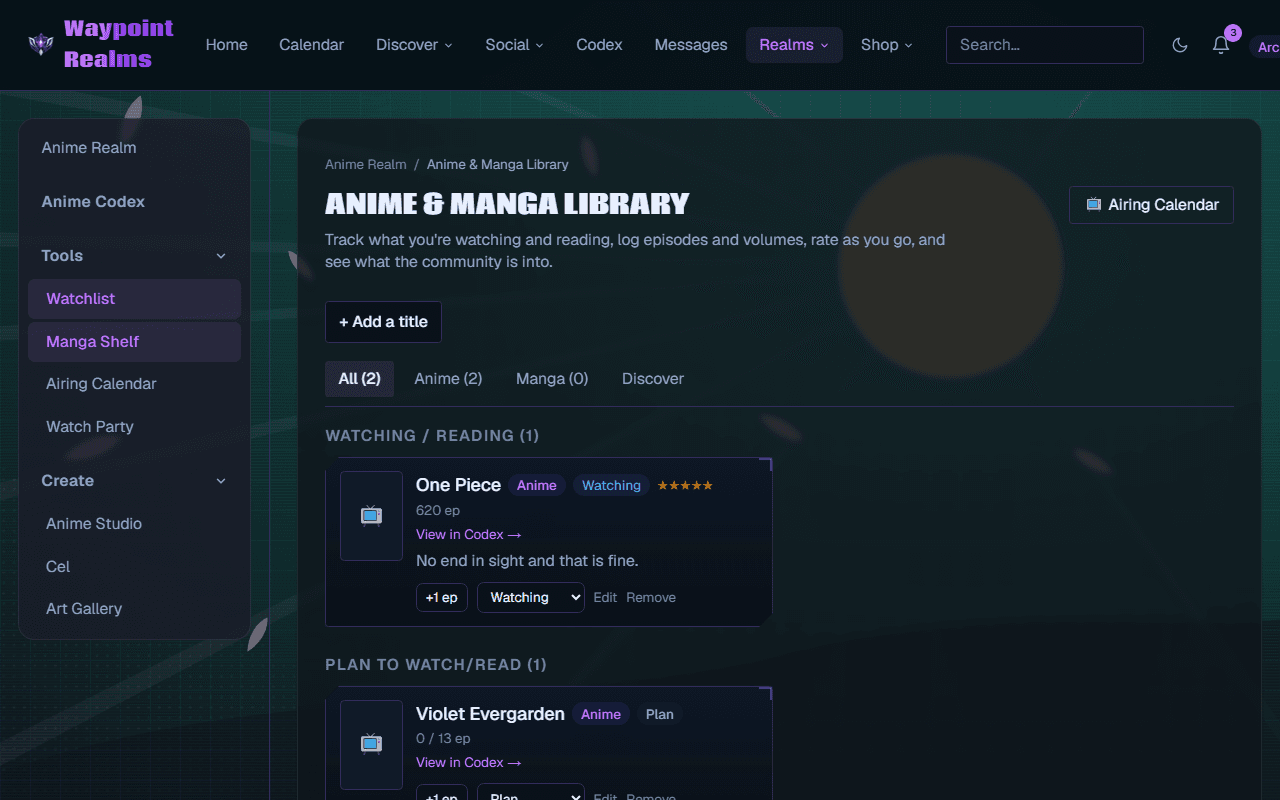
Track as you go
Log an episode
Press +1 ep (+1 vol for manga) on the card. Reach the total and it moves to Completed by itself.Change the status
Use the card's status menu — Plan, Watching, Rewatching, Completed, On hold, Dropped.Edit the details
Edit reopens the form; Remove takes it out of your library.
Scores and rewatches
From a show's page in the Atlas, Start tracking adds it as Watching and Plan to watch as Plan, and Mark episode … watched logs episodes there too.
If something's off
- “Episode … hasn't aired yet — episode … is the latest.”
- You're caught up. +1 works again when the next one is out.
- “That title is already in your library.”
- It's there already — search your library for it.
- +1 ep is greyed out or missing
- Progress has reached the total, or the show is Completed or Dropped.
- “Too many requests. Please slow down and try again shortly.”
- You pressed +1 very quickly many times. Wait a moment.
Still stuck? Browse all help or contact us. To report someone or something, use the report action on the relevant profile, post, or session — it sends us the context automatically.