Start a campaign
Create a persistent campaign: name it, choose the system and who can see it, and decide whether you or the AI Game Master runs it.
- ~5 min
- New to it
- Part 1 of 10
- Needs Plus or Pro
A campaign is a group that plays together across many sessions: one party, one story, its sessions, notes and lore in one place. This series takes you from an empty campaign to a running table. Part 1 creates it; it takes a few minutes, and almost everything here can be tuned later in settings.
Before you start
- Plus or Pro to create and lead a campaign. Plus runs 2 at a time (and can add a slot for $2 a month); Pro has no limit. Anyone can play in a campaign they're added to. See Waypoint Pro.
- For an AI-run campaign, AI credits: every AI turn is paid from the GM's balance (part 5).
Create the campaign
Open New campaign
In the TTRPG Realm's rail, open Campaigns and choose New campaign.Name it
Type a Name (two to 80 characters) — Curse of Strahd, say.Choose the system
Pick one in System (optional): Dungeons & Dragons 5e, Pathfinder 2e, Call of Cthulhu and the rest, or Custom / other. It tells the AI GM which rules to use.Describe it
A line or two in Description (optional) — what the campaign is about.Choose who can see it
Under Visibility: Private — only members (the default), Unlisted — anyone with the link, or Public — listed. This can't be changed later, so choose with care.Run it under a Circle (optional)
If you belong to a Circle, Circle (optional) files the campaign on its page. A private campaign stays hidden there too; choose Unlisted or Public for Circle members to see it.Choose the Game Master
Under Game Master, pick Human GM (you) or AI Game Master.Create it
Press Create campaign.
If you chose the AI Game Master
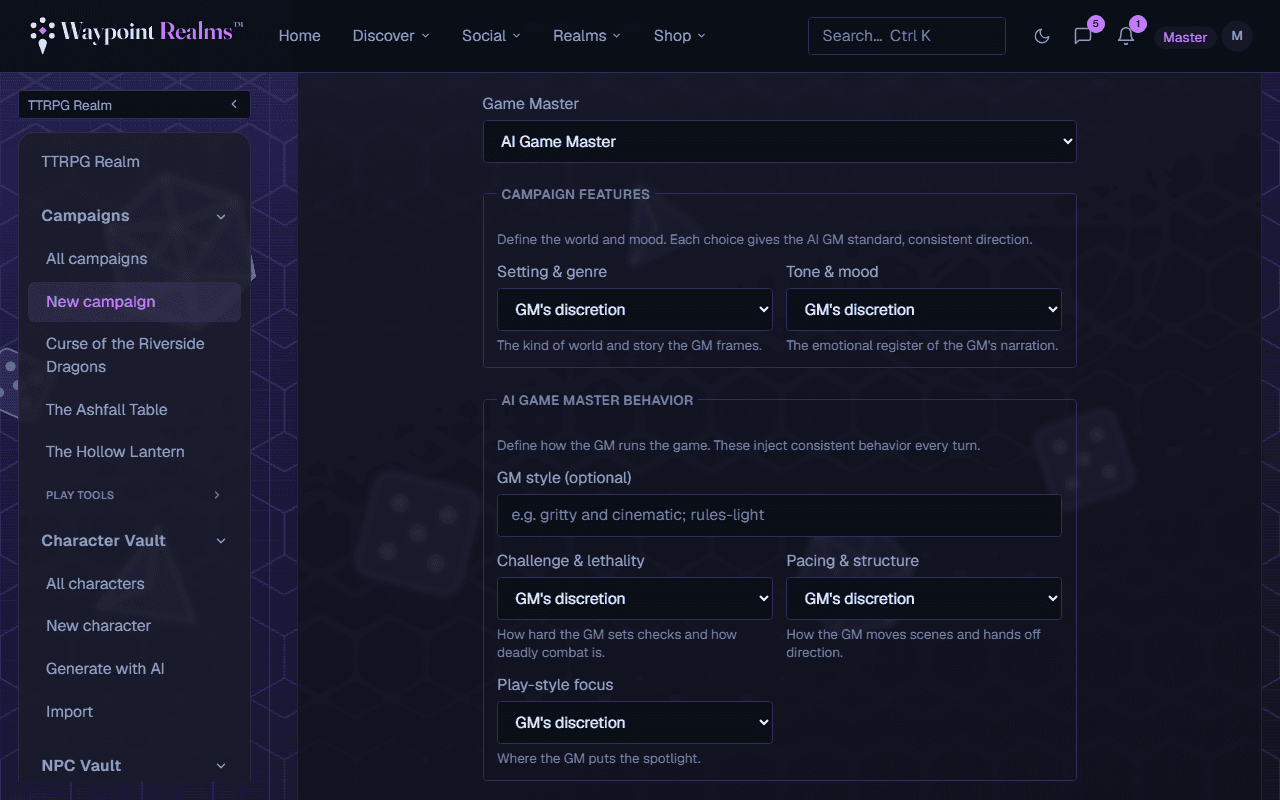
More fields appear. Every one is optional; anything left on GM's discretion is the AI's call.
Set the world
Under Campaign features, choose a Setting & genre (High fantasy, Science fiction, Horror…) and a Tone & mood (Heroic & hopeful, Gritty & grounded…).Set how the GM runs it
Under AI Game Master behavior, describe a GM style (optional) and pick Challenge & lethality, Pacing & structure and Play-style focus.Give it a starting point
In Extra context & starting direction (optional), write the world, house rules and where the story opens. You can edit this later in settings.
Check it worked
Set once
If something's off
- I see “Campaigns are a Plus feature.” instead of the form
- Creating campaigns needs Plus or Pro. See plans → shows the options.
- “Your plan includes 2 campaigns. Upgrade to run more.”
- You're running as many as your plan allows. Upgrade to Pro, or on Plus add a campaign slot from the banner on the Campaigns page.
- “Creating new campaigns is temporarily paused.”
- New campaigns are switched off for a while. Your existing campaigns carry on; try again later.
Still stuck? Browse all help or contact us. To report someone or something, use the report action on the relevant profile, post, or session — it sends us the context automatically.