Create a character by hand
Pick a game system and fill in the sheet yourself — name, scores, skills, combat, spells and gear — then save it to your Character Vault.
- ~15 min
- New to it
- Part 1 of 5
This part builds a character from a blank sheet, the way you would with a pencil. It uses Dungeons & Dragons 5e, the sheet with the most help built in; the other seven systems work the same way with their own fields. If you would rather start from a rolled character, skip to part 2; if you already have a sheet, part 3 imports it.
Before you start
- A Waypoint account. Making characters is free.
- A free character slot. Free keeps 2 characters, Plus 10 and Pro as many as you like; Plus members can add 10 more slots. See Waypoint Pro.
- About 15 minutes, or your existing paper sheet to copy from.
Make the character
Open the Character Vault
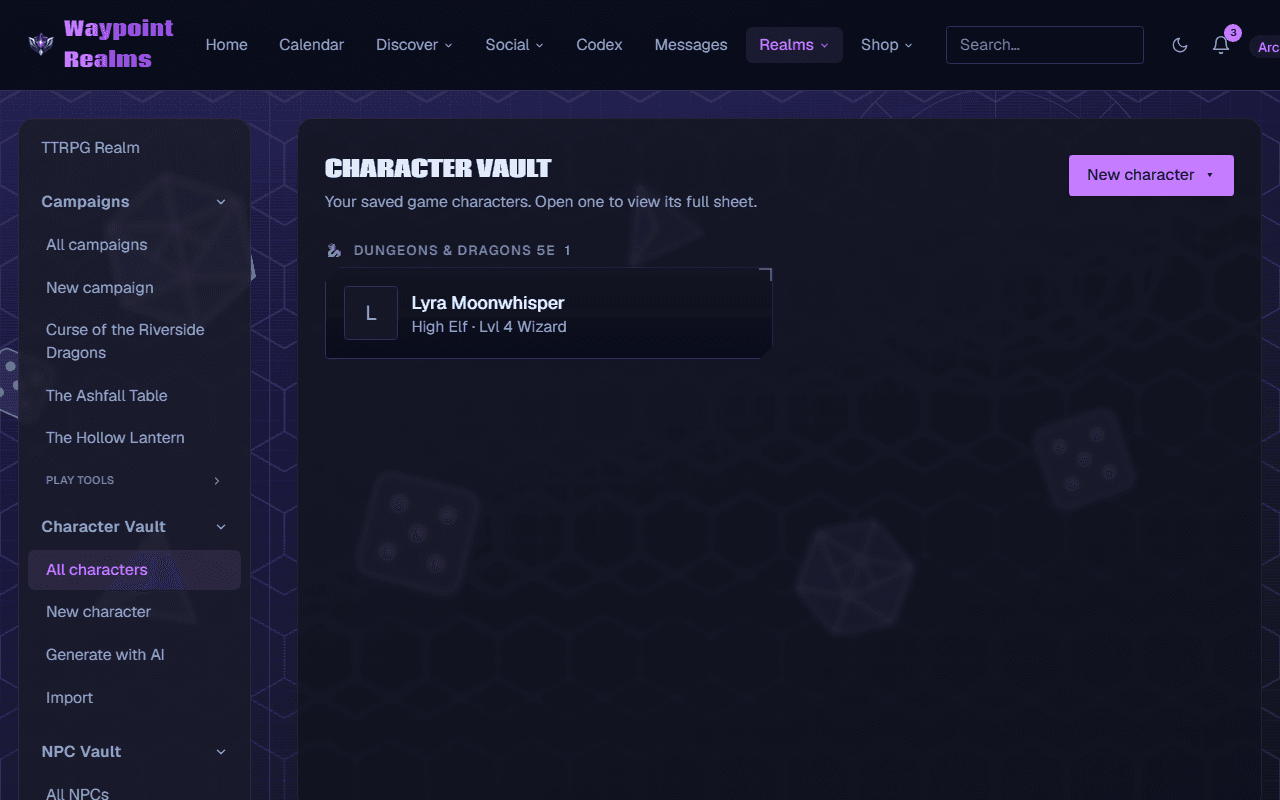
In the TTRPG Realm, open Character Vault in the left rail and choose All characters. The vault groups your characters by game system.Start a new character
Press New character ▾ at the top right and choose Manually create. (With an empty vault, the New character button in the middle of the page does the same.)Choose the game system
The page says Choose a game system to start a new character. Press Dungeons & Dragons 5e. The sheet opens in place.Name the character and set the edition
Type the name where the sheet says Character name. Under Rules edition, keep D&D 2024 (the current Player's Handbook) or choose D&D 2014 if your table still plays the older rules. The edition decides which species, backgrounds and feats the sheet offers.Fill in the banner
Choose Class, type a Subclass if you have one, set Level, and pick a Species (called Race on a 2014 sheet). Background suggests the 2024 backgrounds as you type, and a 2024 sheet adds Origin feat. Alignment is optional in 2024.Enter the ability scores
Under Ability Scores, type each score into the small box under STR, DEX, CON, INT, WIS and CHA. The big number above each box is the modifier, worked out for you. Tick the inspiration box below them if your character has it.Mark saving throws and skills
Under Saving Throws and Skills, tick the box for each one you are proficient in. Skills have a second box for expertise (double proficiency). The totals use your scores and your Proficiency bonus.Fill in Combat
Set Armor Class, Initiative, Speed (ft), Hit Dice (for example 1d10), Max HP and Current HP.Add attacks, spells and gear
Under Actions, press + Add action and fill in the name, the to-hit bonus and the damage (for example 1d8+3). Under Spells, choose a Spellcasting ability, then + Add spell: as you type, the sheet suggests spells from the Compendium, and picking one fills in its level. Tick prep for prepared spells. + Add item under Equipment works the same way for gear.Save it
Fill in as much of Personality, Appearance and Notes as you like, then press Create character at the bottom.
Check it worked
Look up a rule without losing your work
The other systems
Pathfinder 2e, Call of Cthulhu, Champions / HERO System, Mutants & Masterminds, Marvel Multiverse RPG, Masks: A New Generation and Custom / other open their own sheets from the same picker. Each has the fields its game uses, and each saves with Create character. Custom / other is a free-form sheet for any game we don't have a sheet for yet.
If something's off
- “Give your character a name.”
- The sheet won't save without one. Type it in Character name at the top of the sheet.
- “Your plan includes 2 character slots and they're all in use…”
- Every slot is taken. Delete a character you no longer need, upgrade, or (on Plus) add 10 more slots from the banner at the top of the vault. The number in the message is your plan's.
- “You have unsaved changes to this sheet from earlier.”
- The sheet keeps a draft while you type. Press Restore them to carry on where you left off, or Discard to start clean.
Still stuck? Browse all help or contact us. To report someone or something, use the report action on the relevant profile, post, or session — it sends us the context automatically.