Find a design, see it at your size, and get it
Browse the Design Shop, check how a piece will fit you before you take it, clone a free design or buy a priced one, and open your copy in Piece Forge.
- ~5 min
- New to it
- Part 1 of 2
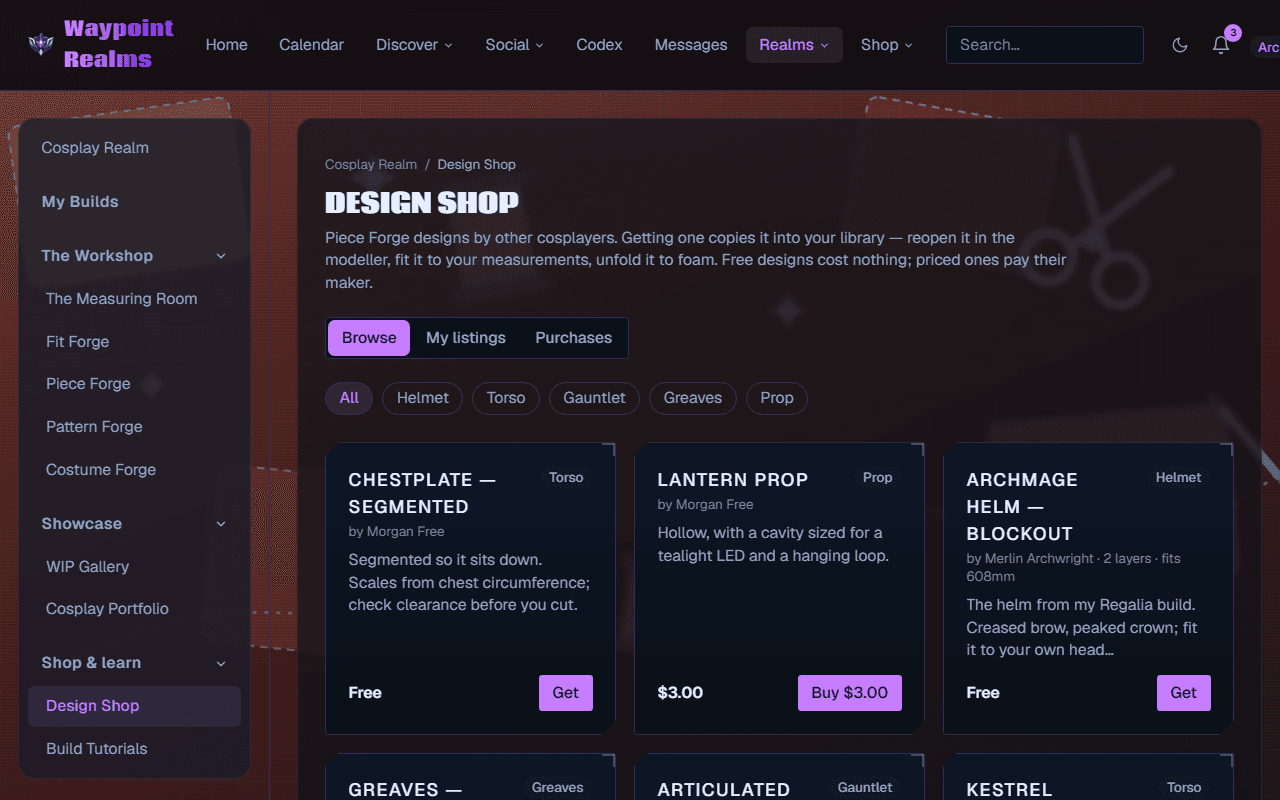
The Design Shop is a shelf of Piece Forge designs other cosplayers have made — helmets, masks, armour plates, props. Every design unfolds to your measurements, not the maker's, so you can see how it will fit before you take it.
Before you start
- A Waypoint account. Getting designs and using them is free on every plan.
- Your measurements in the Measuring Room, so the shop can show each piece at your size (optional, but it's the point).
- For a priced design, a card for checkout. Designs can't be bought inside the app yet — use a browser.
Find one
Open the Design Shop
In the Cosplay Realm's rail, choose Design Shop (under Shop & learn). The Browse tab is the shelf.Search and sort
Type in Search designs — a title, a series, a word from the description — pick Newest or Most got, and press Search.Filter by kind and series
Tap a kind — helmet, mask, torso, back plate, pauldron, vambrace, bracer, belt, greaves, prop — or all. When designs name a series, a second row filters by it.Read the card
Each card shows the price (Free or a price), what it unfolds to (panels, sheets and foam area), its licence, the size it was modelled at (sized for a 56.0 cm head), how many members got it, and — with your measurements — how it fits On your profile. Press the picture to turn it round.
Check it fits before you take it
Open the listing
Press the design's title. Drag the turntable (or use ◀ Turn left / Turn right ▶) to see it from every side.Read Sizing
Sizing says what it scales from, what it was modelled at, what it's cut from, and On you: whether it fits as published, or what Resize to fit will make of it for your body and how much foam that takes. With several bodies, pick which one.See how it goes together
How it goes together lists the build steps — cut, score, bevel, join, try it on — written from the templates as published.
Get it
Clone or buy
Press Clone to my library for a free design, or Buy · $… for a priced one, which goes to card checkout and back.Open your copy
Press In your library →. Your copy opens in Piece Forge, where you resize it to your measurements, change it, and unfold it to templates.
Check it worked
What the licence lets you do
If something's off
- “The Design Shop is paused for now…”
- You can browse, but getting designs is switched off until it reopens.
- “Designs can't be bought in the app yet…”
- Open the Design Shop in a browser to buy a priced design. Free designs clone anywhere.
- “Payment received for … It will appear in your library in a moment”
- The payment is through but not recorded yet. Check Purchases after a moment.
- Sizing says your profile has no measurement yet
- Press Add it in the Measuring Room ›, measure it, and come back.
Still stuck? Browse all help or contact us. To report someone or something, use the report action on the relevant profile, post, or session — it sends us the context automatically.